
Semantic Models
How Stackless defines governed measures, dimensions, joins, and business names for dashboards, chart cards, and Monitors.
What is a Semantic Model?
A Semantic Model is the business-facing layer on top of a warehouse table or Transformation Model. It defines which measures and dimensions exist, how they are named and calculated, and how models join. Dashboards, Agent chart cards, and Monitor checks all query Semantic Models, so the same metric is calculated the same way everywhere.
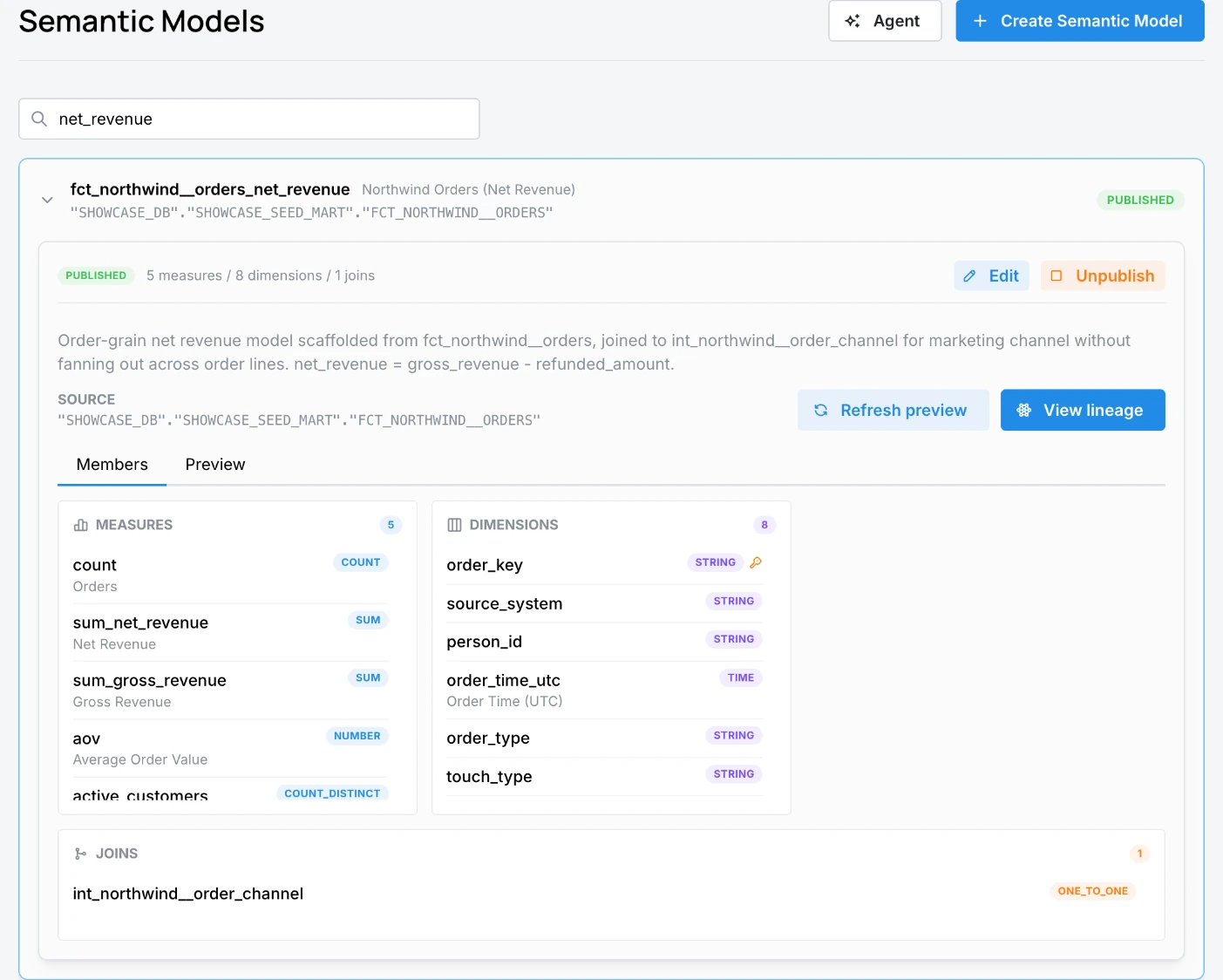
What a Semantic Model contains
- Source: a table from the Catalog, usually a published Transformation Model.
- Measures: aggregations such as
count,count_distinct,sum,avg,min,max, or a customnumberexpression like net revenue divided by orders. - Dimensions: fields to slice by, typed as
string,number,boolean,time, orgeo, with one marked as the primary key. - Joins to other Semantic Models, declared as
one_to_one,one_to_many, ormany_to_one. - Titles and descriptions for business users.
Use Transformation Models as the source
When business logic exists, point the Semantic Model at the transformed table, not the raw source:
Raw source tables -> orders_enriched (Transformation Model) -> orders (Semantic Model) -> dashboards
This keeps cleanup, dedupe, and attribution logic in one place. A Semantic Model can only use a table your role can access in the Catalog.
The Semantic Models page
Go to Data > Semantic Models. The Semantic Model Agent panel opens beside the list; use Hide Agent to close it.
Models are grouped by name. Each card shows its source table and whether it is published, a private draft, or both. Expand a card to see:
- The number of measures, dimensions, and joins.
- Edit, Publish (drafts), Unpublish (published, administrators only), and Delete (drafts only).
- Source transformation, which links to the Transformation Model behind it.
- Preview to query the model, and View lineage to open it in the Catalog.
- The Members tab listing measures, dimensions, and joins, and a Preview tab where you pick measures and dimensions and click Run preview.
Create a Semantic Model
The quickest way is to ask the Semantic Model Agent, for example: "Create a semantic model on fct_northwind__orders with net revenue, orders, AOV, and active customers, sliced by order date and channel."
To build one yourself, click Create Semantic Model (requires core/models:write):
- Name & Description: a machine name and a description.
- Choose Table: pick a table from the Catalog. Stackless imports its columns as dimensions and adds a count measure.
- Review, then Create Semantic Model.
The new model is a private draft. Click Edit to refine it:
- General: title and description.
- Schema: measures, dimensions, and joins.
- Preview: chart the model as a KPI, line, bar, column, or table with a granularity, date range, and row limit, then Run Preview.
Drafts and publishing
- New models and edits are private drafts. Editing a published model saves your changes to a private draft; the published version keeps serving dashboards until you publish.
- Publish makes the draft the shared version used by dashboards and the Agent.
- Unpublish (administrators only) returns a published model to draft. Check its lineage first, because dashboards that use it will stop working.
- Only drafts can be deleted.
Publish when the source table is stable, measures and dimensions have business-friendly names, joins match the grain, and a preview returns the numbers you expect. When a dashboard is published with draft models it depends on, the publish dialog offers to publish those models too.
Measures
| Measure | Typical definition |
|---|---|
| Orders | Count of order rows. |
| Net revenue | Sum of revenue after refunds, as defined in the transformation. |
| Active customers | Count of distinct customers. |
| AOV | Net revenue divided by orders. |
| ROAS | Revenue divided by ad spend. |
Exact formulas vary by workspace. Use a dashboard's Metric definitions drawer or ask the Agent to confirm what a measure means.
Dimensions and joins
Dimensions should match the grain of the underlying table. If the model is one row per order, avoid dimensions that imply line-item detail unless the table supports it.
Joins let dashboards combine measures and dimensions across related models, such as orders joined to customers. Review every join for grain: a many-to-many relationship, or a join to a finer-grained table, can multiply measures. For example, joining orders to order lines and then summing an order-level shipping fee counts the fee once per line.
Permissions
| Permission | Allows |
|---|---|
core/models:read | View Semantic Models and run previews. |
core/models:write | Create, edit, publish, and delete drafts. |
admin role | Unpublish a model. |
core/agents:chat | Use the Semantic Model Agent. |
Agent prompts for Semantic Models
- "List the Semantic Models I can use for dashboards."
- "Show the measures and dimensions on the orders model."
- "Create a Semantic Model on the published orders_enriched transformation."
- "Preview revenue by channel for the last 30 days using this model."
- "Could this join double-count revenue?"